14 ASTRORIDE A6.0 Elliptical + Bluetooth - User Manual www.reebokfitness.info 15
A
B
E
F
D
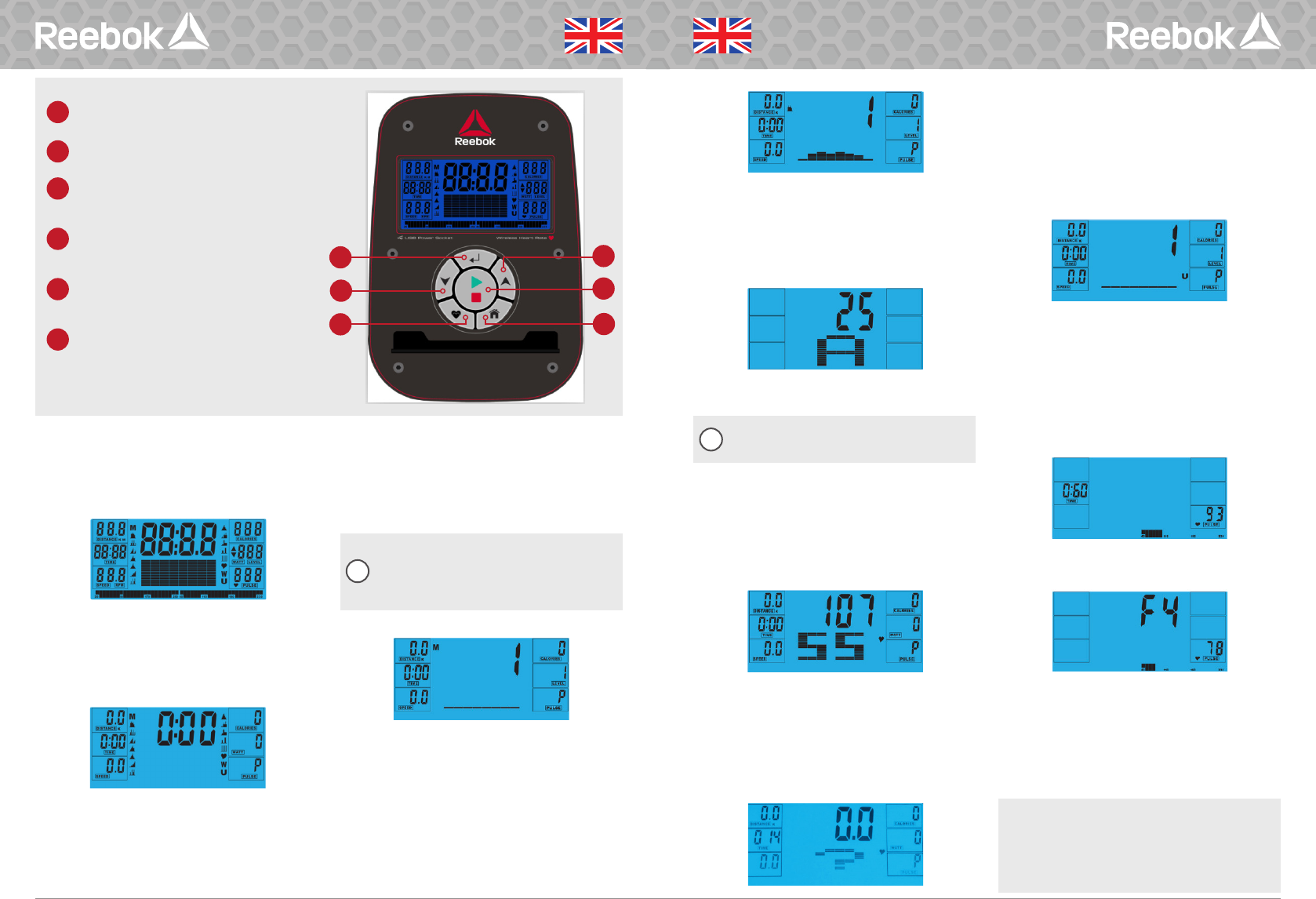
BUTTON FUNCTIONS
A
ENTER
Used to confirm a setting or selection.
B
RECOVERY
To test heart rate recovery.
C
DOWN
To select training mode and adjust function
value down.
D
RESET
Used to reset the functions at any time. Please
note STOP must be pressed before RESET.
E
UP
To select training mode and adjust function
value up.
F
START/STOP
To start or stop exercise.
select M, then highlight value (Speed, Distance, Time,
Pulse), use UP/DOWN to alter the data, and then press
ENTER to confirm the setting. Press START to begin
when details have been inputted. The inputted data will
now count down from the entered information.
When setting the WATT level the resistance
will automatically adjust to the preset WATTS
regardless of the speed (except for very slow
speed and higher WATTS settings where the
resistance can only increase to 32).
PROGRAM
1. In main menu press UP/DOWN to highlight the
program function.
2. Press ENTER P1 will be displayed (After 2 seconds
the program profile will be shown).
3. Use UP/DOWN to select program P1-P12.
4. Press ENTER to enter the program.
5. Use UP/DOWN to change the program level.
6. Press START to begin.
OPERATION PROCEDURE
When the power supply is connected to the machine
the computer will power on with a long beep sound. All
segments of the LCD display will light up for 2 seconds
and the wheel diameter 78” will be displayed as below.
The main menu will be displayed. The user can press
START to begin immediately in the manual mode. All
Values (SPEED, DISTANCE, TIME) will count up from
zero. Resistance level can be changed at any time
during exercise by pressing UP or DOWN.
Before beginning the manual exercise the user can set
the desired workout for TIME, DISTANCE, CALORIES
and PULSE.
From main menu press UP/DOWN buttons to highlight
MANUAL at the top of the screen. Press ENTER to
ENGLISH
ENGLISH
C
i
i
H.R.C (HEART RATE CONTROL)
1. In main menu press UP/DOWN to hightlight TARGET
H.R.
2. Press ENTER to select.
3. Age will be displayed, press UP/DOWN to change.
4. Press ENTER to move to next section.
5. The % of heart rate workout will be displayed. Press
UP/DOWN between 55%, 75%, 90% and THR.
THR is the users preferred TARGET HEART RATE
to work out to. This can be altered before the
exercise is started.
Maximum users heart rate is worked out at 220
-
age
=
total TARGET HEART RATE. This is the maximum your
heart rate (MHR) should be. You can then work out at
55%, 75% or 90% of this. For example 220
-
25(users
age)
=
195 MHR, from here you can work out at the
desired %.
6. Press ENTER to confirm.
7. Computer will record the TARGET HEART RATE and
allow the user to work out within this. The resistance
level will automatically be changed.
8. If the heart rate is too high the computer will beep to
indicate this.
9. If no heart rate is being recorded the below will be
displayed on the screen. In this instance ensure that
both hands are securely holding the pulse sensors.
USER PROGRAM
User can create own profile.
1. In main menu press UP/DOWN to select USER.
2. Program profile will be displayed as below.
3. Press UP/DOWN to alter resistance level in the first
segment of the profile.
4. Press ENTER to move to the next segment.
5. Continue the above for all columns.
6. Press START to begin exercise once complete.
RECOVERY
At any time during workout RECOVERY button can be
pressed to record recovery level.
• Press RECOVERY button.
• Place both hands on the pulse sensors.
• Computer will count down from 60 seconds and
display the PULSE as below. DO NOT REMOVE YOUR
HAND FROM PULSE SENSORS OR THE READING
WILL NOT BE GIVEN.
• After the computer has counted down for 60
seconds a RECOVERY level reading will be given.
RECOVERY
F1 Excellent
F2 Very Good
F3 Good
F4 Satisfactory
F5 Below Average
F6 Poor
NOTE
• This computer is powered by a 9V power adaptor. DO NOT
USE ANY OTHER ADAPTOR WITH THE MACHINE.
• If the computer is inactive for approximately 4 minutes it will
shut down automatically and the resistance motor will reset.
Press any button to turn the computer back on.
• If at any time the computer does not function correctly remove
the power supply and reconnect it to restart.


この商品に関する会話に参加する
ここでは、リーボック A6.0 Astroride (Bluetooth) クロストレーナー についての意見を共有できます。 疑問がある場合は、まず説明書をよく読んでください。 マニュアルのご請求は、お問い合わせフォームより承ります。