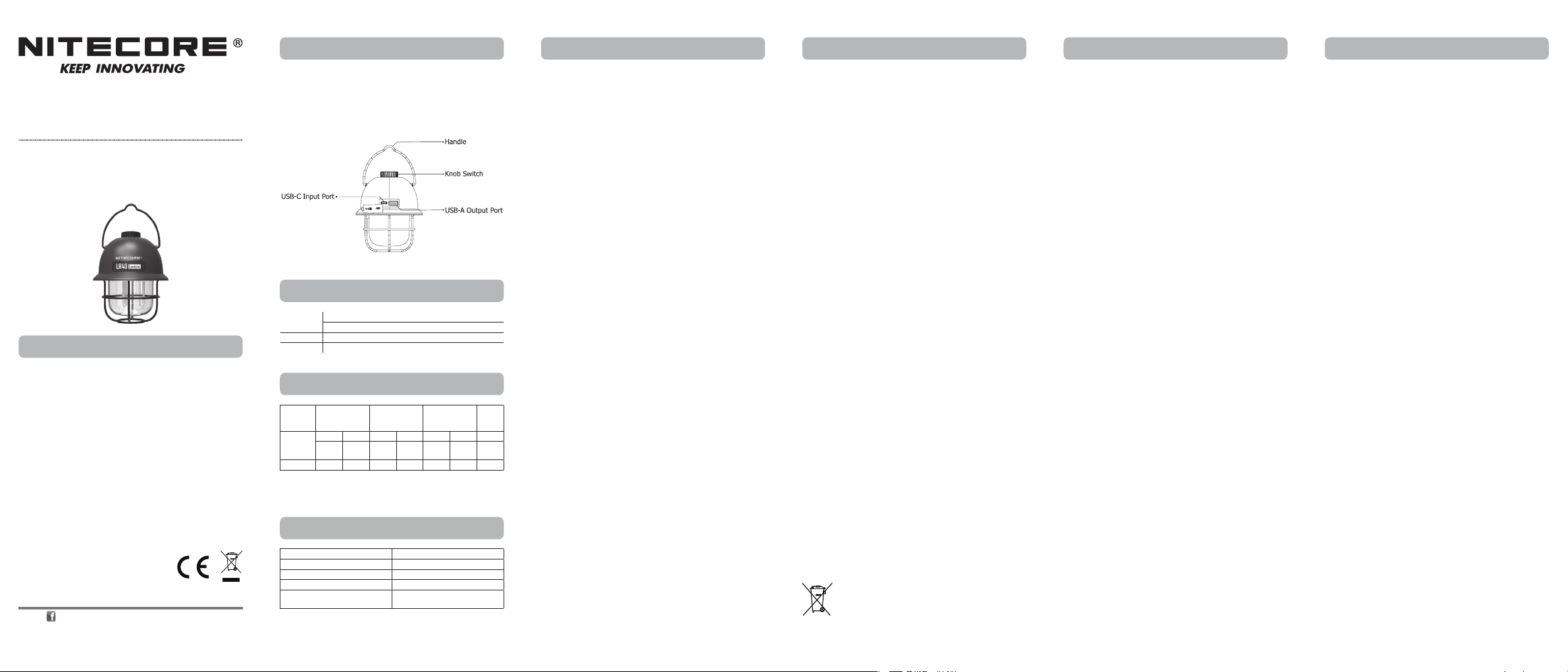
LR40
Charging Function
Power Connection: Use the USB cable to connect the USB-C Input Port
to a USB adapter / power bank / other USB charging devices (Power Supply
Output: 5V⎓1A) to begin the charging process. The charging time is approx.
4 hours.
Charging Indication: During the charging process, blue indicators will
ash slowly to inform the user. When the battery is fully charged, blue
indicators will become steadily turned on. (The lighting function is available
during the charging process.)
Operating Instructions
On / O
On: When the light is o, long press the Knob Switch for 2 seconds to turn
on the Warm Light.
O: When the light is on, long press the Knob Switch for 2 seconds to turn
it o.
Light Sources Switching
When the light is on, short press the Knob Switch to cycle through the
following light sources: Warm Light – White Light – Warm White Light – Red
Light SOS.
Brightness Adjustment
When the light is on, rotate the Knob Switch to adjust brightness in a
stepless way.
Charging the External Device
Available with the USB-A output, the LR40 can be used as a power supply to
charge external devices.
Connecting to the External Device: Use the USB cable to connect an
external USB device to the USB-A Output Port to begin the charging process.
Discharging Indication: During the discharging process, blue indicators
will become steadily turned on. (Output Voltage: 5V; Output Current: 1A
Max)
Power Indication
When the light is o, short press the Knob Switch, and the corresponding
power indicators next to it will turn on to indicate the remaining battery
power.
Warnings
1. CAUTION! Possible dangerous radiation! Don't look into the light! May be
dangerous for your eyes.
2. It is normal that the product may heat up during the charging or
discharging process.
3. DO NOT immerse the product in water.
4. Keep away from re and high temperature environment.
5. DO NOT drop, bump, throw or shake the product, or it may damage the
internal components.
6. DO NOT disassemble or modify the product as doing so will cause
damage to it and render the product warranty invalid. Please refer to the
warranty section in the manual for complete warranty information.
7. Please recharge the product every 3 months when left unused for a
prolonged time.
8. Dispose of the device/batteries in accordance with applicable local laws
and regulations.
SYSMAX Innovations Co., Ltd.
TEL: +86-20-83862000
FAX: +86-20-83882723
Web: www.nitecore.com
Address
:
Unit 6355, 5/F, No. 1021 Gaopu Road,
Tianhe District, Guangzhou, 510653, Guangdong, China
Please nd us on facebook : NITECORE Flashlight
Thanks for purchasing NITECORE!
Made in China
• 3 Light Sources
• Stepless Brightness Adjustment
• USB-C Input & USB-A Output
Multifunctional USB-C Rechargeable Camping Lantern
LR10104022
Power Indication
Specications
Technical Data
Warranty Service
Features (English) LR40 (Deutsch) LR40
All NITECORE
®
products are warranted for quality. Any DOA / defective
product can be exchanged for a replacement through a local distributor/
dealer within 15 days of purchase. After that, all defective / malfunctioning
NITECORE
®
products can be repaired free of charge within 24 months
from the date of purchase. Beyond 24 months, a limited warranty applies,
covering the cost of labor and maintenance, but not the cost of accessories
or replacement parts.
The warranty will be nullied if
1. the product(s) is/are broken down, reconstructed and/or modied by
unauthorized parties;
2. the product(s) is/are damaged due to improper use.
For the latest information on NITECORE
®
products and services, please
contact a local NITECORE
®
distributor or send an email to service@nitecore.
com
※ All images, texts and statements specied herein this user manual are
for reference purposes only. Should any discrepancy occur between
this manual and information specied on www.nitecore.com, Sysmax
Innovations Co., Ltd. reserves the rights to interpret and amend the
content of this document at any time without prior notice.
• Multifunctional USB-C rechargeable camping lantern
• 3 light sources and 1 special mode with a max output of 100 lumens and
stepless brightness adjustment
• Built-in 4,000mAh rechargeable Li-ion battery
• Built-in intelligent Li-ion battery charging and discharging circuit, available
to be used as a power supply
• USB-C input port and USB-A output port
• Handle designed on the top, ideal for various environments
Lighting
Mode
Warm Light White Light
Warm White
Light
Red
Light
SOS
Brightness
Min Max Min Max Min Max /
15
Lumens
80
Lumens
15
Lumens
50
Lumens
10
Lumens
100
Lumens
10
Lumens
Runtime 45h 15h 38h 10h 65h 8h /
Note: The stated data is measured by using the built-in Li-ion battery
(4,000mAh 3.7V) under laboratory conditions. The data may vary in real
world use due to dierent battery usage or environmental conditions.
Status of Indicators Power Level
4 Constant-on Approx. 100%
3 Constant-on Approx. 75%
2 Constant-on Approx. 50%
1 Constant-on
Approx. 25% (Please charge the
product as soon as possible)
(Francais) LR40 (Русский) LR40
Ladefunktion
Stromanschluss: Verwenden Sie das USB-Kabel, um den USB-C-Eingang
mit einem USB-Adapter / einer Powerbank / anderen USB-Ladegeräten
(Stromversorgungsausgang: 5V⎓1A) zu verbinden, um den Ladevorgang zu
starten. Die Ladezeit beträgt ca. 4 Stunden.
Anzeige des Ladevorgangs: Während des Ladevorgangs blinken die
blauen LEDs langsam. Wenn der Akku vollständig aufgeladen ist, leuchten
die blauen LEDs dauerhaft. (Die Beleuchtungsfunktion ist auch während des
Ladevorgangs verfügbar.)
Bedienungsanleitung
Ein-/Ausschalten
Ein: Wenn das Licht ausgeschaltet ist, drücken Sie den Drehknopf 2 Sek.
lang, um das warme Licht einzuschalten.
Aus: Wenn das Licht eingeschaltet ist, drücken Sie den Drehknopf 2 Sek.
lang, um es auszuschalten.
Wahl der Lichtquelle
Wenn das Licht eingeschaltet ist, drücken Sie kurz auf den Drehknopf, um
zwischen folgenden Lichtquellen zu wechseln: „Warmes Licht“ – „Weißes
Licht“ – „Warmweißes Licht“ – „Rotes SOS Licht“.
Helligkeitsstufen
Wenn das Licht eingeschaltet ist, drehen Sie den Drehknopf, um die
Helligkeit stufenlos einzustellen..
Laden externer Geräte
Mit dem USB-A-Ausgang kann die LR40 als Stromquelle zum Laden externer
Geräte verwendet werden.
Anschließen an das externe Gerät: Verwenden Sie das USB-Kabel, um
ein externes USB-Gerät an den USB-A-Ausgang anzuschließen und den
Ladevorgang zu starten.
Anzeige des Entladevorgangs: Während des Entladevorgangs leuchten
die blauen LEDs kontinuierlich auf. (Ausgangsspannung: 5V; Ausgangsstrom:
1A (max))
Anzeige des Energiepegels
Wenn das Licht aus ist, drücken Sie kurz auf den Drehknopf, und die
entsprechenden LEDs daneben leuchten auf, um die verbleibende Energie
anzuzeigen.
WARNUNGEN:
1. VORSICHT! Mögliche gefährliche Strahlung! Schauen sie NICHT in das
Licht! Dies kann gefährlich für Ihre Augen sein!
2. Es ist normal, dass sich das Produkt während des Lade- oder
Entladevorgangs erwärmt.
3. Tauchen Sie das Produkt NICHT in Wasser ein.
4. Halten Sie es fern von Feuer und hohen Temperaturen.
5. Lassen Sie das Gerät NICHT fallen, stoßen, werfen oder schütteln Sie es
nicht, da sonst die internen Komponenten beschädigt werden könnten.
6. Zerlegen Sie das Produkt und modizieren Sie es NICHT, da es
sonst beschädigt wird und die Produktgarantie erlischt. Vollständige
Informationen zur Garantie nden Sie im Abschnitt "Garantiebedingungen".
7. Bitte laden Sie das Produkt alle 3 Monate auf, wenn es längere Zeit nicht
benutzt wird.
8. Entsorgen Sie das Gerät/die Batterien in Übereinstimmung mit den
geltenden örtlichen Gesetzen und Vorschriften.
Entsorgung von Elektro- und Elektronikgeräten
Die durchgestrichene Mülltonne bedeutet, dass Sie gesetzlich
verpichtet sind, diese Geräte einer vom unsortierten
Siedlungsabfall getrennten Erfassung zuzuführen. Die Entsorgung
über die Restmülltonne oder die gelbe Tonne ist untersagt.
Enthalten die Produkte Batterien oder Akkus, die nicht fest
verbaut sind, müssen diese vor der Entsorgung entnommen und getrennt als
Batterie entsorgt werden.
Fonction de charge
Connexion d’alimentation : Utilisez le câble USB pour connecter le
port d’entrée USB-C à un adaptateur USB / batterie externe / autres
périphériques de charge USB (sortie d’alimentation : 5V ⎓1A) pour
commencer le processus de charge. Le temps de charge est d’environ 4
heures.
Indication de charge : Pendant le processus de charge, les indicateurs
bleus clignotent lentement pour informer l’utilisateur. Lorsque la batterie
est complètement chargée, les indicateurs bleus s’allument. (La fonction
d’éclairage est disponible pendant le processus de charge.)
Mode d’emploi
ON / OFF
ON : Lorsque la lumière est éteinte, appuyez longuement sur l’interrupteur
pendant 2 secondes pour allumer la lumière chaude.
OFF : Lorsque la lumière est allumée, appuyez longuement sur l’interrupteur
pendant 2 secondes pour l’éteindre.
Changement de mode
Lorsque la lumière est allumée, appuyez brièvement sur l’interrupteur pour
parcourir les sources lumineuses suivantes : Lumière chaude – Lumière
blanche – Lumière blanche chaude – Lumière rouge SOS.
Réglage de la luminosité
Lorsque la lumière est allumée, faites pivoter l’interrupteur pour ajuster
l’intensité lumineuse de manière progressive.
Chargement d’un appareil externe
Disponible avec la sortie USB-A, la LR40 peut être utilisé comme
alimentation pour charger des périphériques externes.
Connexion au périphérique externe : Utilisez le câble USB pour
connecter un périphérique USB externe au port de sortie USB-A an de
commencer le processus de charge.
Indication de décharge : Pendant le processus de décharge, les
indicateurs bleus seront progressivement activés. (Tension de sortie : 5V;
Courant de sortie : 1A Max)
Indication de batterie
Lorsque le voyant est éteint, appuyez brièvement sur l’interrupteur et les
indicateurs d’alimentation correspondants à côté s’allument pour indiquer la
puissance restante de la batterie.
Avertissements
1. ATTENTION ! Radiations dangereuses possibles ! Ne regardez pas le
faisceau directement dans les yeux ! Peut causer des problèmes oculaires.
2. Il est normal que le produit puisse chauer pendant le processus de
charge ou de décharge.
3. NE PAS immerger le produit dans l’eau.
4. Tenir à l’écart du feu et des environnements à haute température.
5. NE PAS heurter, jeter, secouer ou faire tomber le produit, cela pourrait
endommager les composants internes.
6. NE PAS démonter ou modier le produit car cela causerait des dommages
et rendrait la garantie du produit invalide. Veuillez vous référer à la
section de garantie dans le manuel pour obtenir des informations
complètes sur la garantie.
7. Veuillez recharger le produit tous les 3 mois lorsqu’il n’est pas utilisé
pendant une période prolongée.
8. Jetez l’appareil / les piles conformément aux lois et réglementations
locales applicables.
Функция зарядки
Подключение к внешнему источнику питания: используйте USB-
кабель для подключения устройства к USB-адаптеру / блоку питания
/ любому другому зарядному устройству с USB-портом (выход блока
питания: 5 В ⎓ 1 А), чтобы начался заряд. Время зарядки составляет
около 4 часов.
Сообщение уровня заряда: во время зарядки синие индикаторы
будут медленно мигать, сообщая таким образом пользователю
уровень заряда. Когда аккумулятор будет полностью заряжен, синие
индикаторы начнут беспрерывно гореть. (Функция освещения доступна
во время зарядки.)
Инструкция по эксплуатации
Включение / выключение
Включение: когда фонарь выключен, зажмите и удерживайте
переключатель в течение 2 секунд, чтобы включить теплое освещение.
Выключение: когда фонарь включен, зажмите и удерживайте
переключатель в течение 2 секунд, чтобы выключить его.
Переключение между источниками света
При включенном фонаре кратковременно нажимайте на переключатель,
чтобы переключаться между следующими источниками света: теплое
освещение — белое освещение — теплое белое освещение — красное
освещение (SOS).
Регулирование яркости
При включенном фонаре крутите ручку переключателя для плавного
регулирования яркости.
Зарядка внешнего устройства
Благодаря выходу USB-A фонарь LR40 можно использовать в качестве
источника питания для зарядки внешних устройств.
Подключение к внешнему устройству: посредством USB-кабеля
подключите внешнее USB-устройство к выходному порту USB-A, чтобы
начать зарядку.
Сообщение уровня разряда: в процессе разрядки синие индикаторы
начнут беспрерывно гореть. (Выходное напряжение: 5 В; выходной ток:
максимум 1 А)
Определение уровня заряда
При выключенном фонаре кратковременно нажмите на ручку
переключателя, и соответствующие индикаторы питания, находящиеся
рядом с ним, загорятся, сообщая таким образом уровень заряда
аккумулятора.
Меры предосторожности
1. ВНИМАНИЕ! Возможно опасное излучение! Не направляйте луч света
фонаря в глаза! Иначе это может нанести им серьезный вред.
2. Нагревание устройства во время зарядки и разрядки устройства
является нормальным явлением.
3. Не погружайте устройство в воду.
4. Не держите устройство близко к огню, а также не помещайте его в
условия с высокой температурой.
5. НЕ роняйте, не ударяйте, не бросайте и не трясите устройство, так
как это может привести к повреждению внутренних компонентов.
6. НЕ разбирайте устройство и не вносите изменений в его конструкцию
самостоятельно, так как это навредит устройству и приведет к
аннулированию гарантии. Пожалуйста, обратите внимание на
раздел гарантийного обслуживания для получения более подробной
информации.
7. Пожалуйста, не забывайте заряжать устройство каждые 3 месяца,
если не планируете им пользоваться длительное время.
8. Утилизируйте устройство / аккумуляторы в соответствии с
действующим местным законодательством и правилами.
Dimensions:
117mm x 96mm x 96mm
(4.61" x 3.78" x 3.78") (Handle Not Included)
Weight: 222g (7.83 oz) (Accessory Not Included)
Accessory: USB-C Charging Cable



この商品に関する会話に参加する
ここでは、Nitecore LR40 ランプ についての意見を共有できます。 疑問がある場合は、まず説明書をよく読んでください。 マニュアルのご請求は、お問い合わせフォームより承ります。