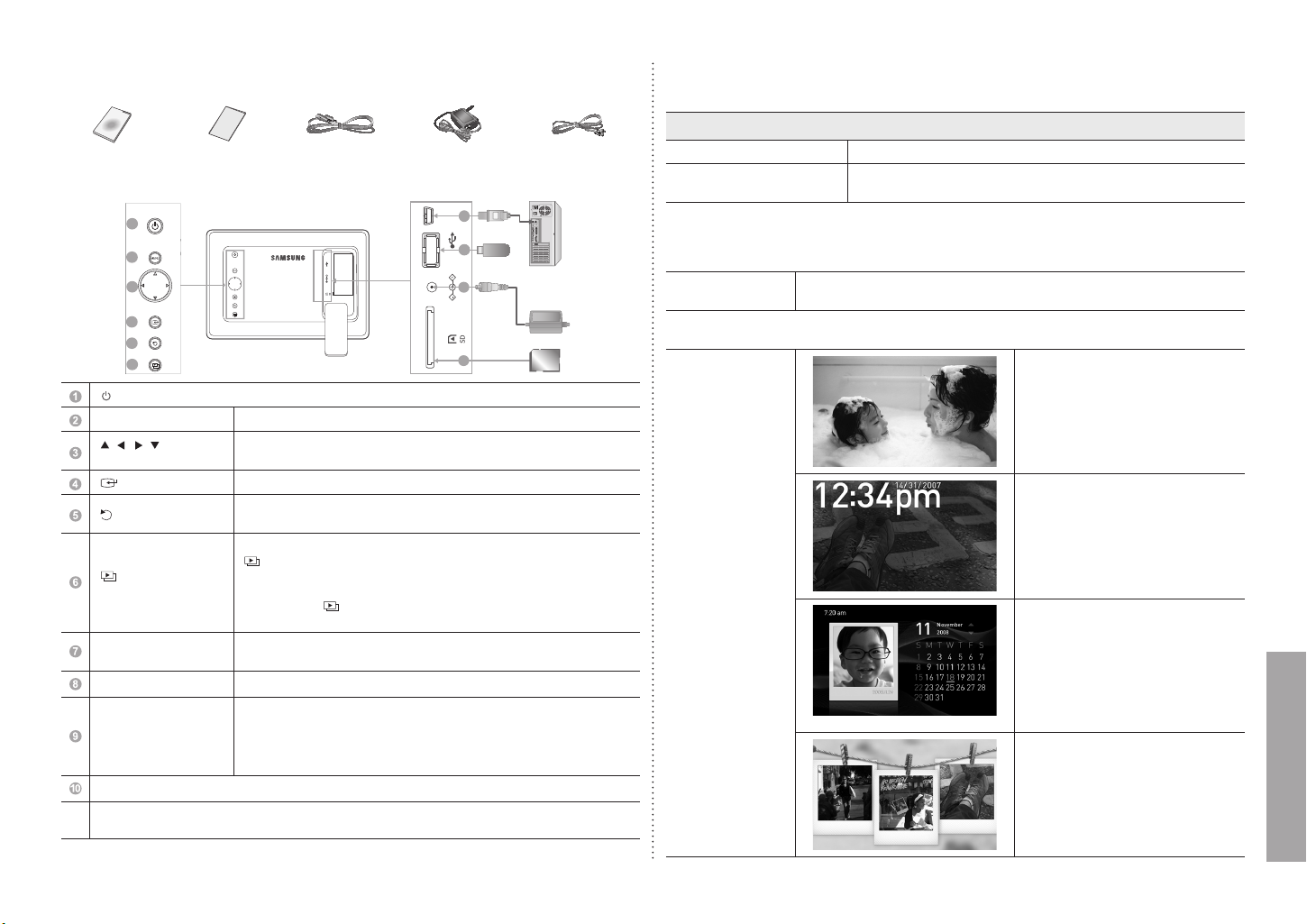
Components
Please check all items are contained in your delivered package
USB cable
Power AdapterPower CodeUser manual Warranty Card
Back Overview / Connections
[ ] Power On/Off button.
[MENU] Menu button Enters or exits a menu. ( Displays the menu.)
[
, , , ]
Navigation buttons
Moves around the items and adjusts a value.
[
] Enter button Selects a function you want to use. ( Play/Stop during a slide show.)
[ ] Back button
Returns to the previous screen.
(Hold down this button for two seconds to return to the Main screen.)
[ ] Slideshow
button
Starts a slideshow. When playing a slideshow by pressing the
[ ] button, the photos in the location of the last played photo are played. If the
photos in the location of the last played photo have been removed, they are
automatically searched for and then played in a slideshow.
If you press the [ ] during slideshow, the slideshow is swicted to different type
of Display Mode. (Single, Photo & Clock, etc.)
USB Upstream
You can Copy and Delete a Frame Memory Photo by connecting the
USB cable to a PC.
USB Downstream for USB storage devices.
Power outlet
※ The product can be operated through a USB cable connection
without a power supply. However, when operating through a USB
cable connection with a power supply, please make sure that the
main USB connector and the sub (DC 5V) USB connector are
both connected to the PC. (for model SPF-87H only.)
SD memory card slot.
・
If no button is operated for ten minutes, the screensaver starts to protect the monitor.
However, the screensaver does not start when in the slideshow mode.
Using
If you press the Menu button, the menu of the selected item is displayed on the screen.
Photo
When selecting a folder Open, Copy, Delete
The menu displayed when
selecting a thumbnail
Start Slideshow, Copy, Copy All Files, Delete, Delete All Files, Set
as Background
If any le is copied to frame memory, the le size is reduced in order to meet the optimal resolution for the panel
size. Please note that [EXIF(exchangeable image le format)] information is removed when the copy option is
set as “Resized” in the [Settings]- [Options] - [Frame Memory Copy]. If you do not want the reszied copy option,
the setttings can be changed as follows [Settings] - [Options] - [Frame Memory Copy] - “Original Size”.
Slide Show
Stop Slideshow, Slideshow Mode, Slide Show Settings, Brightness, Rotate,
Zoom, Aspect Ratio, Delete, Set as Background
This product can only support up to 4,000 pictures. If there are more than 4,000 pictures,
slideshow will not be played for the remaining pictures.
Slideshow Mode
Single
・ Shows only one Photo.
Photo & Clock
・ Shows the Photo, Clock and
Date.
Photo & Calendar
・ Shows the Photo, Calendar
and Clock.
Up and Down key will change to Previous
Month and Next Month respectively.
The following modes [Transition(Slideshow
Settings), Zoom, Aspect Ratio, and Set as
Background] are not available.
Multiview 1
・ Shows three Photos on one
screen.
The following modes
[Transition(Slideshow Settings), Rotate,
Zoom, Aspect Ratio,Delete, and Set as
Background] are not available.
3
English
BN68-01567H.indb 3 2009-05-20��4:09:48


この商品に関する会話に参加する
ここでは、サムスン SPF-107H デジタルフォトフレーム についての意見を共有できます。 疑問がある場合は、まず説明書をよく読んでください。 マニュアルのご請求は、お問い合わせフォームより承ります。
返答 | 役に立った (0) (Googleによる翻訳)