4
© 2015 HARMAN International Industries, Incorporated. All rights reserved.
JBL and CMMD are trademarks of HARMAN International Industries, Incorporated, registered in the United States and/or other countries.
Bluetooth
®
is a registered trademark of Bluetooth SIG, Inc.
Features, specifications and appearance are subject to change without notice.
HARMAN International Industries, Inc.
8500 Balboa Boulevard, Northridge, CA 91329 USA www.jbl.com
TR01319_A
2. Press the association button on the primary speaker. An audible
confirmation will be played to indicate that the speaker successfully
entered association mode. The front LED will blink blue if already
paired with a Bluetooth device, otherwise it will blink white.
3. Wait until association process finishes. The process is complete as
soon as the front LED on each speaker stops blinking.
Note: in case the association needs to be redone for speaker replace-
ment or configuration change, the current association set up needs to
be reset. Press and hold the FWD and REV buttons on the top of the
primary speaker for more than 3 seconds.
It is also possible to associate a second pair of JBL control X wireless
speaker set to an existing pair to extend the system coverage. If you
want to have a set of 4 speakers connected.
1. With all four primary and secondary speaker(s) powered on AC or
Battery power
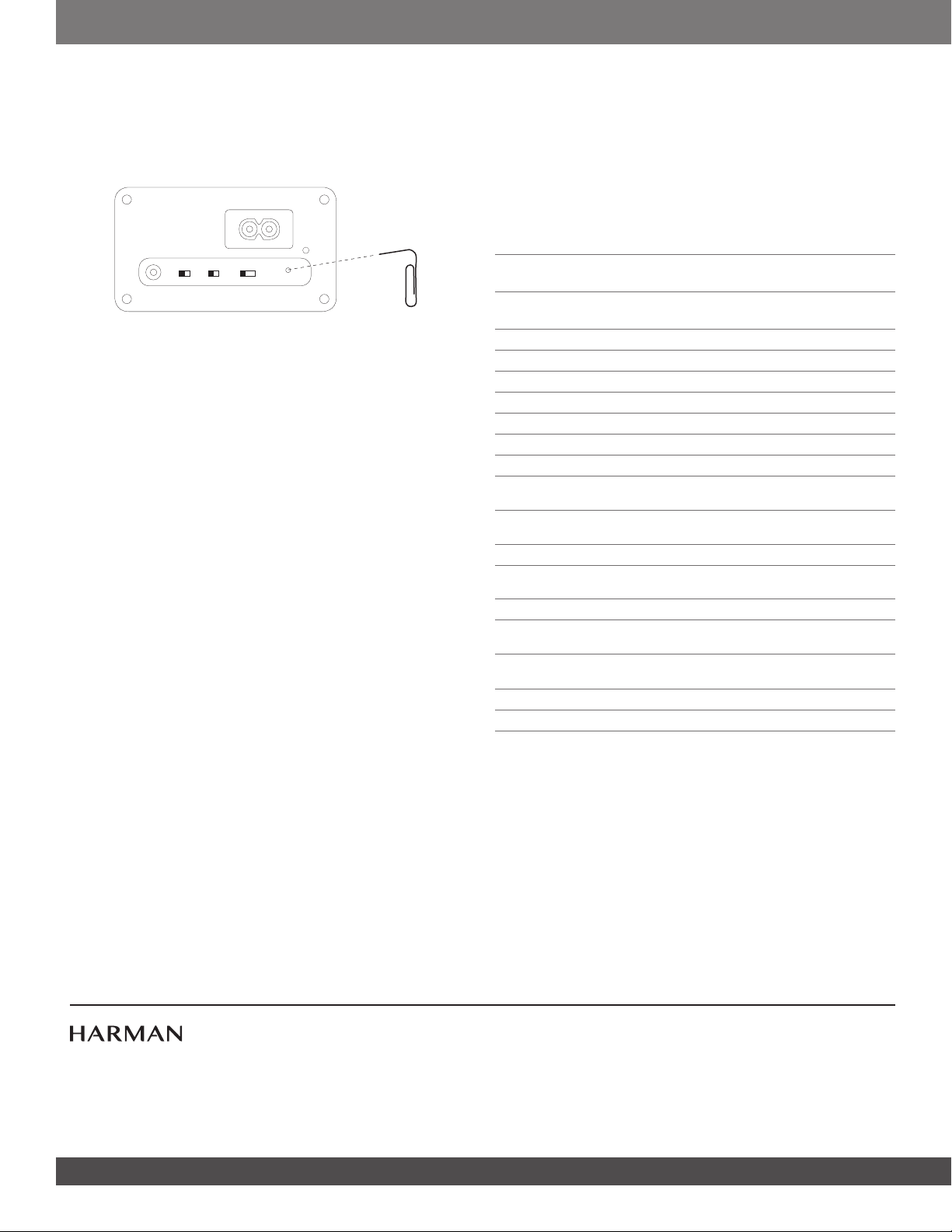
2. Use a paper clip to press the association button on the back of
the second set primary speaker with the back control mode switch
set to secondary “S”. The front LED will flash white indicating
Association mode is active.
3. Press the association button on the primary speaker of the first
master set. An audible confirmation will be played to indicate that
the speaker successfully entered association mode. The front LED
will blink blue if already paired with a Bluetooth device, otherwise it
will blink white.
4. Wait until association process finishes. The process is complete as
soon as the front LED on each speaker stops blinking.
5. Use a paper clip to press the association button on the back of
the second set secondary speaker. The front LED will flash White
indicating Association mode is active.
6. Press the association button on the secondary speaker of the first
master set. An audible confirmation will be played to indicate that
the speaker successfully entered association mode. The front LED
will blink blue if already paired with a Bluetooth device, otherwise it
will blink white.
7. Wait until association process finishes. The process is complete as
soon as the front LED on each speaker stops blinking.
Note: in case the association needs to be redone for speaker
replacement or configuration change, the current association set up
needs to be reset. Press and hold the FWD and REV buttons on the
top of the primary speaker for more than 3 seconds.
MAINTENANCE AND SERVICE
The speaker enclosures may be cleaned using a soft cloth to remove
fingerprints or to wipe off dust.
All wiring connections should be inspected and cleaned or remade
periodically. The frequency of maintenance depends on the metals
involved in the connections, atmospheric conditions and other factors,
but once per year is the minimum. In the event that your system ever
needs service, contact your local JBL dealer or distributor, or visit
www.jbl.com for a service center near you.
BATTERY DISPOSAL
Rechargeable batteries (i.e., nickel cadmium, nickel metalhydride,
lithium and lithium-ion) are considered hazardous household materials
and may pose an unnecessary health and safety risk.
In the European Union and other locations, it is illegal to dispose of any
battery with household trash. All batteries must be disposed of in an
environmentally sound manner. Contact your local waste management
officials for information regarding the environmentally sound collection,
recycling and disposal of used batteries.
SPECIFICATIONS
Low Frequency Transducer:
5.25" (133mm) polypropylene
graphite-filled cone
High Frequency Transducer:
1” (25mm) CMMD
®
Lite dome /
High Definition Imaging Waveguide
Rated Power: 30W per channel RMS (AC mode)
Frequency Response: 62Hz - 20kHz (-6db)
Sensitivity: (2.83V@1m) 87dB
Signal-to-noise ratio: >75 dB
Power supply: AC 100-240 VAC, 50-60Hz
Battery Type: Lithium-ion Polymer (7.4V, 2600mAh)
Battery Charge Time: 2.4 hours @ 0.5C
Playback Time:
Up to 4 hours (varies by volume level
and audio content)
Bluetooth
®
2.1 with AVRCP
profile v1.5
Bluetooth
®
Transmitter Power: 0-4 dBm
Bluetooth
®
Transmitter
Frequency Range:
2.402 – 2.480 GHz
Bluetooth
®
Transmission Range: Up to 10m (from source)
Speaker Range:
Up to 30m (between primary and
secondary speakers)
Dimensions:
9-1/4” x 6-1/2” x 6-1/4”
(235mm x 165mm x 159mm)
Weight: 6.5 lbs (2.95 kg)
Finishes: Graphite / White / Red
AC IN
AUX-IN
L/R/L+R
P S
MODE WALL/OTHER







この商品に関する会話に参加する
ここでは、JBL Control X Wireless スピーカー についての意見を共有できます。 疑問がある場合は、まず説明書をよく読んでください。 マニュアルのご請求は、お問い合わせフォームより承ります。
返答 | 役に立った (1) (Googleによる翻訳)