
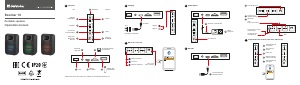
2. What’s in the Box?
3. Cable connection
5. Indicator status
7. Apple AirPlay
8. USB audio streaming input
9. Control
10. Charging
6. Bluetooth input
4. Power on/o
Manual
•Switch input modes,
•Control play,
•Select or customize EQs,
•Upgrade the rmware, and
•More functions.
EN
1. EDIFIER ConneX app
With this app, you can
1. With your sma device, scan the QR code on the quick sta guide or the packaging.
•You can also search for "EDIFIER ConneX" in Apple App Store (iOS devices) or
Google Play (Android devices).
2. Download and install the app.
Download EDIFIER ConneX app
1. Connect your sma device with the speaker via Bluetooth.
2. In Bluetooth mode, open EDIFIER ConneX App on your sma device.
3. Tap the menu for settings and playback control.
Note: BLE connection between your sma device and the speaker keeps alive if the
speaker is switched to other input modes than Bluetooth mode.
How to use this app
Tabletop Wireless Speaker
D32
EDIFIER ConneX app
Note:
•Images are for illustrative purposes only and may dier from the actual product.
•The bundled USB connecting cable is for audio streaming only. Do not use it for
device charging.
•For the need of technical improvement and system upgrade, information and
specications contained herein may be slightly dierent from actual product.
If any dierence is found, the actual product prevails.
Press and hold the " " button to power on/o the speaker.
Note:
When powered by the built-in batte, the speaker will automatically power o if
there is no audio playback or operation for 30 minutes.
Blinking in blue per 0.2s Bluetooth pairing mode
Bluetooth hidden mode
Bluetooth device connected
Muted in AUX mode
AUX mode
Waiting for AirPlay setup
AirPlay setup completed
USB audio streaming mode
Upgrading the rmware
Breathing in blue
Solid blue
Blinking in green
Solid green
Blinking in white
Solid white
Solid red
Blinking in blue and green
Indicator status Speaker status
1. When the speaker is powered on for the rst time, it will auto-enter Bluetooth
pairing mode (LED blinking in blue).
•You can also press the " " or " " button to switch to Bluetooth mode manually .
2. On your device, select "EDIFIER D32" in its Bluetooth device list to connect, and the
blue LED will be steady lit when the connection is established.
•To disconnect from the current Bluetooth device, press and hold the " " button
for 1.5 seconds.
Note:
•Pin code for connection is "0000" if needed.
•To enjoy all Bluetooth functions of this product, make sure that your audio source
device suppos A2DP and AVRCP proles. If no device is connected in 30 minutes,
the speaker will switch to Bluetooth hidden mode. The blue indicator will be in a
breathing pattern. In this mode, (1) new devices cannot nd the speaker, but (2) for
a device that exists in the pairing record of this speaker, you can select "EDIFIER D32"
from its Bluetooth device list to reconnect. To exit from Bluetooth hidden mode,
press the " " button.
Dual-device connection
This speaker suppos the simultaneous connection of two Bluetooth devices.
1. Connect the rst Bluetooth device to the speaker.
2. Press and hold the " " button on the speaker for 1.5 seconds.
3. On the second Bluetooth device, select "EDIFIER D32" in its Bluetooth device list
to connect.
4. On the rst Bluetooth device, select "EDIFIER D32" in its Bluetooth device list to
reconnect.
•Pause or stop playback on the current Bluetooth device before streaming audio
from the second one.
EDIFIER D32
BluetoothSettings
Bluetooth
DEVICES
2:12
EDIFIER D32
BluetoothSettings
Bluetooth
DEVICES
2:12
Note:
•Make sure that your device is connected to your Wi-Fi network before setup.
•The following devices are suppoed:
(1) Mac or PC with iTunes 12.8 or later;
(2) iPhone, iPad, and iPod touch with iOS 11.4 or later;
(3) Apple TV 4K or Apple TV (4th Generation) with tvOS 11.4 or later;
(4) Other devices that suppo AirPlay.
1 2
3 4
Network conguration
Method 1: Apple WAC (Wireless Accesso Conguration)
1. Press the " " button on the speaker to switch to AirPlay mode manually.
2. Press and hold the " " button on the speaker for 1.5 seconds
(white LED blinking rapidly).
3. Access the WLAN setting on your sma device.
4. Select "EDIFIER D32 xxxx" from the AirPlay speaker list to sta the AirPlay setup.
5. Follow the on-screen instructions to complete the setup (white LED steady lit).
Method 2: Apple Home App
1. Press the " " button on the speaker to switch to AirPlay mode manually.
2. Press and hold the " " button on the speaker for 1.5 seconds
(white LED blinking rapidly).
3. Open the Apple Home App on your sma device.
4. Tap "+" and then select "Add or Scan Accesso".
5. Follow the on-screen instructions to complete the setup (white LED steady lit).
Method 3: EDIFIER ConneX App
1. Connect your sma device with the speaker via Bluetooth.
2. In Bluetooth mode, open the EDIFIER ConneX App on your sma device.
3. Tap "Input sources" and then select "AirPlay".
4. Follow the on-screen instructions to complete the setup (white LED steady lit).
Note:
•The following operating systems suppo USB audio streaming: Windows 11,
Windows 10, Windows 8, and Windows 7.
•In USB mode, volume sync is not suppoed. To adjust the volume, adjust on the
speaker and your device separately.
EDIFIER D32
Work mode / Standby mode
Work mode
Bluetooth device connected
Bluetooth hidden mode
AUX mode
Bluetooth mode / AirPlay mode /
USB audio streaming mode
AirPlay mode
Work mode
Work mode
Bluetooth mode / AirPlay mode /
USB audio streaming mode
Bluetooth mode / AirPlay mode /
USB audio streaming mode
Press and hold to switch between
work mode and standby mode.
Press to switch input modes.
Press and hold to disconnect the
current Bluetooth device.
Press to exit from Bluetooth hidden
mode and enter Bluetooth pairing mode.
Press to mute or unmute the speaker.
Press to pause or resume the current
track.
Press and hold to enter AirPlay setup
mode.
Press to increase volume.
Press to decrease volume.
Press and hold to switch to the next
track.
Press and hold to switch to the
previous track.
ModeButton Action
Note:
•In AUX mode, volume sync is not suppoed. To adjust the volume, adjust on the
speaker and your device separately.
Note:
* Power input: 100-240V~ 50/60Hz 0.5A
* This plug type is meant for illustration purpose only.
•The indicator light is solid red when charging and turns o when the batte is full.
•You can play music on the speaker while charging.
*
11. Specications
Total output power (RMS): Treble: 15W+15W, Mid-range and bass: 30W
Frequency response: 52Hz-40kHz
Declaration for EU
Frequency Band (Bluetooth): 2.402GHz ~ 2.480GHz
Frequency Band (Wi-Fi): 2.400GHz ~ 2.4835GHz, 5.15GHz ~ 5.35GHz,
5.47GHz ~ 5.725GHz, 5.725GHz ~ 5.85GHz
RF Power Output: ≤20 dBm (EIRP) (5.725GHz~5.850GHz excluded)
RF Power Output: ≤14 dBm (EIRP) (5.725GHz~5.850GHz)
To learn more about EDIFIER, please visit www.edier.com
For EDIFIER warranty queries, please visit the relevant count page on
www.edier.com and review the section titled Warranty Terms.
USA and Canada: seice@edier.ca
South America: Please visit www.edier.com (English) or www.edierla.com
(Spanish/Pouguese) for local contact information.
This device may be restricted for use, depending on the local network.
Restrictions in the 5GHz band:
According to 10(10) of Directive 2014/53/EU, the packaging shows that this radio
equipment will be subject to some restrictions when placed on the market in
Belgium (BE), Bulgaria (BG), Czech Republic (CZ), Denmark (DK), Germany (DE),
Estonia (EE), Ireland (IE), Greece (EL), Spain (ES), France (FR), Croatia (HR), Italy (IT),
Cyprus (CY), Latvia (LV), Lithuania (LT), Luxembourg (LU), Hunga (HU), Malta (MT),
Netherlands (NL), Austria (AT), Poland (PL), Pougal (PT), Romania (RO), Slovenia (SI),
Slovakia (SK), Finland (FI), Sweden (SE), Norway (NO), the United Kingdom in respect
of Nohern Ireland (UK(NI)) , Iceland (IS), Liechtenstein (LI), Switzerland (CH) and
Turkey (TR).
The WLAN function for this device is restricted to indoor use due to its operation in
the 5.15 to 5.35 GHz frequency range
This equipment should be installed and operated with minimum distance 20cm
between the radiator and your body.
AUX
USB
x1
x1
x1
Edier_Access
EDIFIER D32 XXXX
Other...
WLAN
Settings Edit
OTHER NETWORKS
SET UP NEW AIRPLAY SPEAKER...
2:12
Edier_Access
EDIFIER D32 XXXX
Other...
WLAN
Settings Edit
OTHER NETWORKS
SET UP NEW AIRPLAY SPEAKER...
2:12
AirPlay Setup
Cancel Done
Setting up this AirPlay speaker to join
“My Wi-Fi”.
Joining My Wi-Fi...
2:12
AirPlay Complete
Done
This AirPlay speaker joined “My Wi-Fi”.
2:12
AirPlay Complete
Done
This AirPlay speaker joined “Edier-WanTest”.
2:12
My Wi
Show Other Networks...
Speaker Name EDIFIER D32 XXXX
AirPlay Setup
Cancel Next
This AirPlay speaker will be set up to join
“My Wi-Fi”.
NETWORK
SPEAKER PASSWORD
2:12
Password Optional
Verify Verify Password
Edier-WanTest
Show Other Networkss...
Speaker Name EDIFIER D32 XXXX
AirPlay Setup
Cancel Next
This AirPlay speaker will be set up to join
“Edier-WanTest”.
NETWORK
SPEAKER PSSWORD
2:12
Password Optional
Werify Verify Password
My Wi-Fi
Show Other Networkss...
Speaker Name EDIFIER D32 XXXX
AirPlay Setup
Cancel Next
This AirPlay speaker will be set up to join
“Edier-WanTest”.
NETWORK
SPEAKER PSSWORD
2:12
Password Optional
Werify Verify Password
Speaker
USB-CtoUSB-Caudiocable
3.5mm-to-3.5mmaudiocable
Power cable
Quick
sta guide
Impoant
safety instructions
1.5s









この商品に関する会話に参加する
ここでは、Edifier D32 スピーカー についての意見を共有できます。 疑問がある場合は、まず説明書をよく読んでください。 マニュアルのご請求は、お問い合わせフォームより承ります。